
We’ve all been there. You’re researching something — a coffee maker, a hiking trail, some obscure racing team — and you end up with fourteen tabs open, trying to remember which one had the answer you need. Tab hopping is the default state of the modern web, and it’s exhausting.
Google’s latest update to AI Mode in Chrome actually addresses this head-on. No more switching back and forth. No more losing your train of thought because you clicked a link and forgot why.
Side-by-side without the fuss
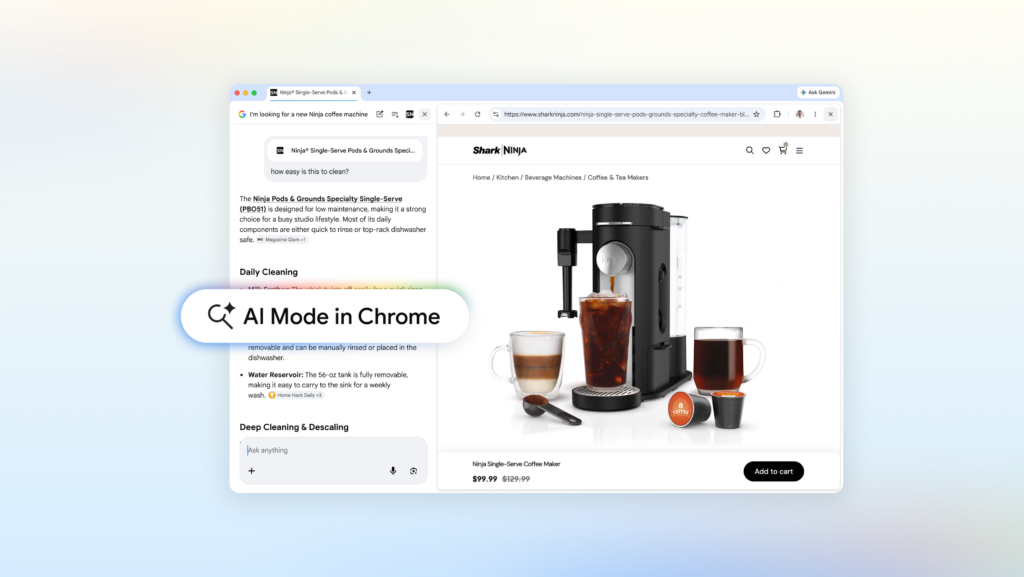
The headline feature here is straightforward: when you’re in AI Mode on Chrome desktop and you click a link, the page opens right next to your search. Not in a new tab. Not in a popup. Right there, beside the AI conversation.
This matters more than it sounds. Let’s say you’re shopping for a compact coffee maker that also does lattes. You ask AI Mode, get a list of options, see one you like. Click the link, and now the retailer’s site is open alongside your search. You can ask “How easy is this to clean?” and AI Mode uses context from that page — plus the broader web — to give you a real answer. No tab switching, no re-typing your query.
Same goes for research. Want to understand McLaren’s different racing teams and how their pit crews train? Open the official site alongside AI Mode, ask follow-ups as you read, and keep digging without breaking flow. Our early testers apparently loved not having to juggle tabs for long articles or videos. I believe it.
Search across your tabs — yes, all of them
Here’s where it gets interesting. On both desktop and mobile, you can now pull context from your already-open tabs into AI Mode. There’s a new “plus” menu in the search box on the New Tab page (or inside AI Mode itself) that lets you select recent tabs, images, or files like PDFs. Mix and match however you want.
Practical example: you’re researching local hiking trails and have five sites open. Add those tabs to your search and ask for similar kid-friendly trails in a different location. AI Mode processes everything together.
Or you’re studying for a statistics midterm. You’ve got class notes, lecture slides, and academic papers open. Bring them all into AI Mode and ask for more examples to illustrate a tricky concept. The response is tailored to your actual material, and it suggests more sites to explore.
This is the kind of feature that sounds minor on paper but changes how you work. I’ve been testing it, and the ability to query across multiple tabs without manually copying text or rephrasing questions is a genuine time-saver.
The bigger picture
Google is clearly trying to make Chrome the hub of your online activity, not just a vessel for websites. AI Mode now feels less like a gimmick and more like a legitimate rethinking of search interaction. Canvas and image creation tools are also accessible within AI Mode, though I haven’t found those as compelling yet.
Is it perfect? No. The side-by-side view can feel cramped on smaller screens, and I’d like more control over how AI Mode prioritizes context from different tabs. But the direction is right. Tab hopping has been the unspoken tax of web browsing for too long. It’s about time someone addressed it.
If you’re on Chrome desktop, give it a shot. Start a search in AI Mode, click a link, and ask a follow-up. See if you don’t feel a little less frantic.
Comments (0)
Login Log in to comment.
Be the first to comment!