
I’ve been watching the gap between robot research and deployment for years. You get a nice dataset on the Hugging Face Hub, train a policy, test it in simulation, and then the real world hits you with five different tools that don’t talk to each other. Recording, training, simulation, hardware deployment, fleet coordination — each one a separate silo.
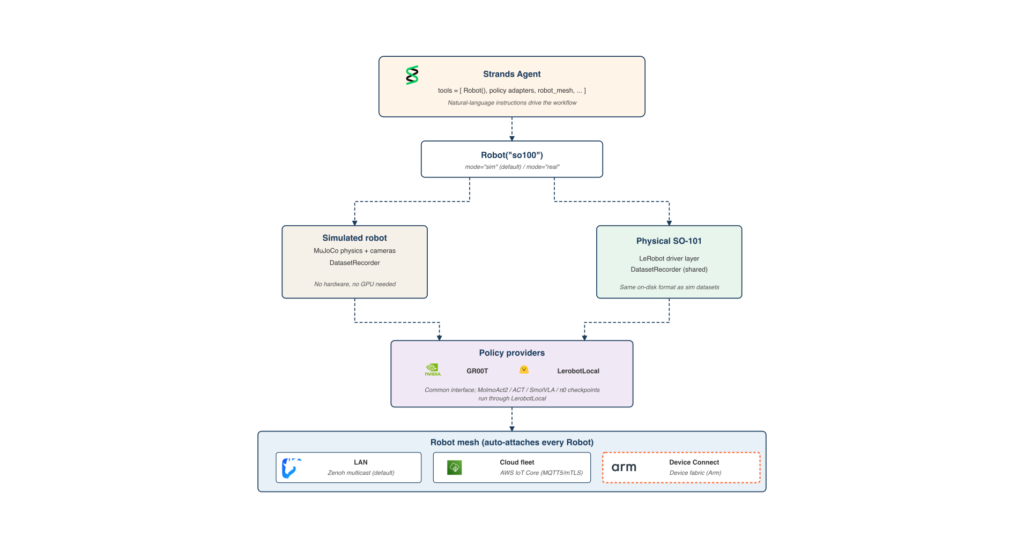
Strands Robots is AWS’s open source answer (Apache 2.0) and it’s refreshingly pragmatic. Instead of building yet another robot framework, they expose LeRobot’s stack as AgentTools inside a single Strands agent. The integration is thin by design: LeRobot’s own scripts handle hardware recording and calibration, and Strands just orchestrates the parts an agent actually cares about. The simulation tool records LeRobotDatasets in the same format LeRobot writes on hardware. GR00T and LerobotLocal serve policy inference behind a common interface, and MolmoAct2 checkpoints run through the LerobotLocal path. A peer mesh fans the agent out to remote robots.
Five steps inside one agent
The example walks through building an agent that records demonstrations in simulation, pushes the result to the Hub, runs a policy against that same format, and deploys to a physical SO-101 with one keyword argument change. When you have more than one robot, the agent coordinates the fleet through a built-in peer mesh.
Two design choices make this work. First, Robot("so100") returns a simulation by default — no hardware, no risk — and mode="real" returns a hardware-backed robot driven by LeRobot. The agent code is identical across both modes. Second, the DatasetRecorder that writes a LeRobotDataset is shared between the simulation path and LeRobot’s own hardware recording, so a dataset captured in MuJoCo and one captured from a physical SO-101 are in the same format.
The whole workflow in five lines of Python:
from strands_robots import Robot
from strands import Agent

arm = Robot("so100")
agent = Agent(tools=[arm])
agent("Pick up the red cube")
That’s deceptively simple. What follows is what’s actually happening inside that call.
Prerequisites
Minimal (default simulation path):
- Python 3.12+, on Linux or macOS (Apple Silicon supported for the MuJoCo backend).
- A Strands-compatible model provider for the agent’s reasoning. Amazon Bedrock with AWS credentials, the Anthropic API, OpenAI, or Ollama running locally.
- Strands Robots installed with the install extras:
uv pip install "strands-robots[sim-mujoco,lerobot,mesh]"
The example runs end-to-end on a laptop with these three. No hardware, no GPU, no Hugging Face credentials needed for the default path.
Advanced (hardware deployment, real policies, Hub push):
- A Hugging Face account and token with write permission, for pushing datasets and pulling policy checkpoints from the Hub.
- For the hardware path: an SO-101 follower and leader pair, or any other LeRobot-supported robot. Both devices need calibration files under
~/.cache/huggingface/lerobot/calibration/. - For local GR00T inference: an NVIDIA GPU with at least 16 GB of video memory and Docker installed. The post uses the
gr00t_inferencetool’slifecycle="full"action, which pulls the image, downloads a checkpoint, and starts the container in one call.
Step 1 – Set up the example
Install Strands Robots and get the example files:
uv pip install "strands-robots[sim-mujoco,lerobot,mesh]"
git clone https://github.com/strands-labs/robots.git
cd robots
Export your Hugging Face token if you want the agent to push datasets or pull policies from the Hub. This is optional for the default simulation path; the example runs end-to-end with the Mock policy and writes the dataset to your local cache without needing Hub access.
export HF_TOKEN=hf_...
The runnable example lives at examples/lerobot/hub_to_hardware.py (Python script) and hub_to_hardware.ipynb (notebook), in the strands-labs/robots repository alongside the MuJoCo and LIBERO examples. The notebook is the recommended starting point: open it in JupyterLab and run cells top-to-bottom in simulation mode without any hardware.
What actually happens inside the agent loop
The agent loop is surprisingly straightforward. When you call agent("Pick up the red cube"), the Strands agent:
- Sends the instruction to the LLM for reasoning.
- The LLM decides to use the Robot tool, which calls the LeRobot policy.
- The policy reads the current observation from the robot (sim or real), runs inference, and returns an action.
- The action gets executed on the robot.
- The result feeds back into the agent loop for the next step.
This is where the integration shines. The dataset format stays exactly as LeRobot wrote it; the agent loop is just the glue. No format conversion, no custom bridges, no fragile middleware.
Recording demonstrations
In simulation, you can record new demonstrations as LeRobotDatasets directly. The DatasetRecorder tool wraps LeRobot’s recording logic, so the output is identical to what you’d get from a physical robot. Push it to the Hub with one call, and you’ve got a dataset ready for training or sharing.
Running policies
The policy inference is abstracted behind two providers: GR00T and LerobotLocal. GR00T runs the NVIDIA GR00T model in a Docker container (requires GPU), while LerobotLocal runs any LeRobot-compatible checkpoint locally. MolmoAct2 checkpoints go through the LerobotLocal path. The agent just calls infer(observation) and gets an action back, regardless of which provider is behind it.
Deploying to hardware
This is where the one keyword argument change comes in. Robot("so100", mode="real") returns a hardware-backed robot driven by LeRobot. The agent code is identical. LeRobot’s own CLIs (lerobot-record, lerobot-calibrate) handle the bring-up; the agent picks up from there. For hardware recording and calibration, you still need those CLIs, but the agent handles the orchestration.
Fleet coordination
When you have more than one robot, the Strands agent can coordinate the whole fleet through a built-in peer mesh over Zenoh. Broadcast commands to all robots, or target specific ones. The mesh is transparent to the agent code; you just add more Robot tools.
What I think
This is the first time I’ve seen someone actually solve the toolchain fragmentation problem without adding more complexity. Strands doesn’t replace LeRobot — it just wraps it in agent tools and gets out of the way. The fact that the same agent code runs in simulation and on hardware with one argument change is the kind of pragmatism that makes me want to actually build something with it.
The notebook is the right starting point. No hardware, no GPU, no Hugging Face credentials needed. Just Python 3.12+, a model provider, and the install command. Run cells top-to-bottom, see the agent loop in action, and decide if you want to go to hardware.
The runnable companion lives at examples/lerobot/hub_to_hardware.py and hub_to_hardware.ipynb in the strands-labs/robots repository. Clone it, run it, and see if you agree.
Comments (0)
Login Log in to comment.
Be the first to comment!